Quick answer: the AI automations paying for themselves in Indian small businesses right now are unglamorous — first-response to enquiries, lead qualification, quote drafting, follow-up sequences, invoice and document extraction, weekly reporting, and review management. Not one of them replaces a person. All of them remove work that was already being done badly because nobody had time to do it well.
Most AI content aimed at small businesses is about potential. This is not. Below are seven workflows, described specifically enough that you could brief someone to build one — including where each breaks, and when it is not worth the money.
The pattern across all seven: AI is best at the work that happens between the work. Nobody’s core job is copying form submissions into a CRM, but somebody does it, badly, at 7pm.
1. First-response to enquiries
Replaces: the four-hour gap between an enquiry arriving and someone replying.
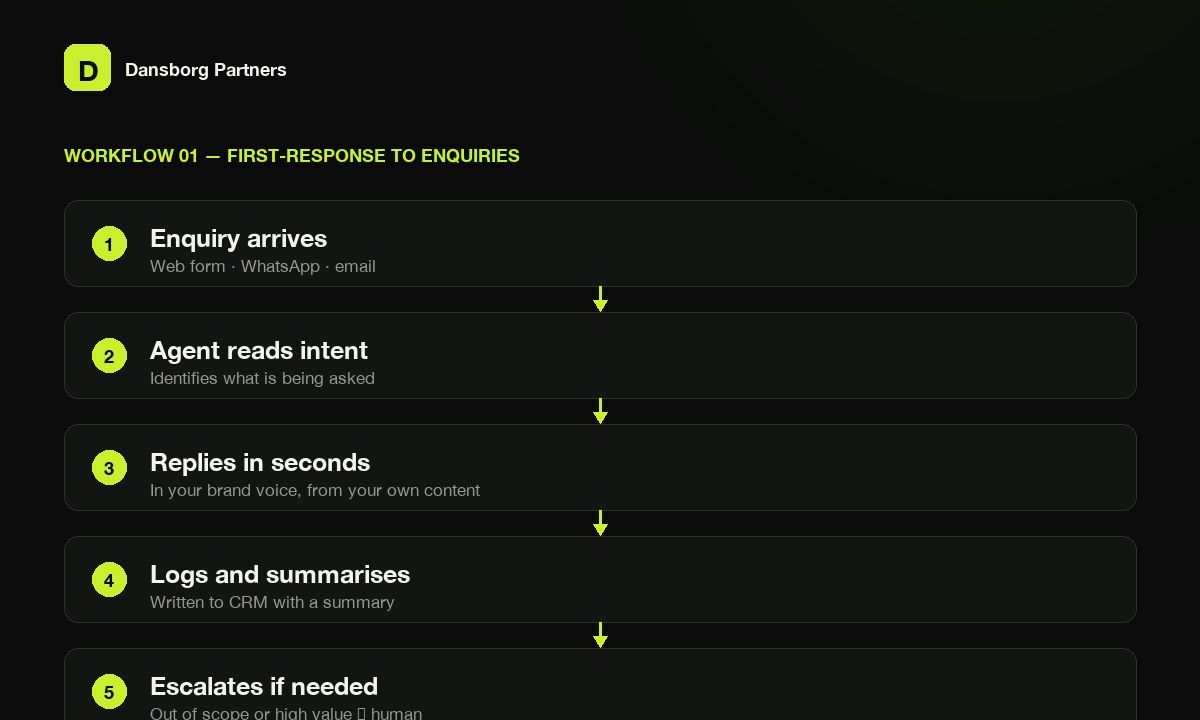
How it runs
- Enquiry arrives (web form / WhatsApp / email)
- Agent reads it and identifies what is being asked
- Replies in your brand voice within seconds, from your own content
- Logs the enquiry with a summary
- Escalates to a human if out of scope or high value
Why it works: The gap between a four-hour response and a four-second one is not a labour saving — it is a conversion difference. Leads go to whoever replied first.
Where it breaks: An agent that answers confidently when it should not. The escalation rule matters more than answer quality.
Typical cost: ₹40,000–1,00,000 to build.
2. Lead qualification and routing
Replaces: a salesperson spending the first ten minutes of every call working out whether the call was worth taking.
How it runs
- Agent asks 3–5 qualifying questions conversationally
- Scores against your criteria — budget, timeline, fit, location
- Routes: hot to sales with a summary, warm to nurture, out of scope to a polite decline
- Writes everything to the CRM
Why it works: It is not about rejecting people. Your team arrives at every conversation already knowing what the person needs. The summary is often more valuable than the score.
Where it breaks: Over-aggressive qualification. Interrogate people before they are interested and they leave. Two or three questions, then hand over.
Typical cost: ₹1,00,000–2,50,000 to build.
3. Quote and proposal drafting
Replaces: two hours of copy-pasting from the last similar proposal.
How it runs
- Sales notes, call transcript or enquiry details go in
- Agent retrieves your past proposals, pricing and service descriptions
- Drafts a scoped proposal in your format
- Human reviews, adjusts and sends
Why it works: The agent must draft only from your actual pricing and service material — never estimate. An invented number in front of a client is worse than no agent.
Where it breaks: Businesses whose pricing lives in three people’s heads. If you cannot point the agent at a source of truth, build the source of truth first.
Typical cost: ₹1,00,000–2,50,000 to build.
4. Follow-up sequences that read the room
Replaces: the follow-up nobody sends because it feels awkward.
How it runs
- Lead goes quiet
- Agent checks context — what they asked, how far they got, what was sent
- Drafts a follow-up referencing the actual conversation
- Sends on schedule or queues for approval
- Stops immediately on reply, or after a set number of attempts
Why it works: Generic “just checking in” emails are ignored because they are obviously automated. A follow-up referencing what the person actually asked about reads like a person wrote it.
Where it breaks: The stop condition. Get it wrong and you are the business that kept emailing someone who already said no.
Typical cost: ₹40,000–1,50,000 to build.
5. Document and invoice extraction
Replaces: manual data entry from PDFs, bills, purchase orders and forms.
How it runs
- Document arrives by email, upload or WhatsApp
- Agent extracts vendor, amount, date, line items and GST
- Validates against expected ranges and flags anomalies
- Writes to your accounting system or sheet
- Routes exceptions to a human
Why it works: The least exciting item here and often the highest hours saved. Also the most reliably correct, because the task is narrow and verifiable.
Where it breaks: Poor scans and non-standard formats. Expect 90-something percent accuracy, not 100 — an extraction workflow without a review queue will quietly corrupt your books.
Typical cost: ₹1,00,000–3,00,000 to build.
6. Weekly reporting
Replaces: somebody’s Monday morning.
How it runs
- Scheduled trigger fires
- Pulls from ad platforms, analytics, CRM and sheets
- Agent assembles the numbers and writes the commentary
- Delivers to email, WhatsApp or Slack
Why it works: The numbers part is plain automation, not AI, and is cheaper built that way. AI earns its place in the commentary — turning “conversions down 12%” into why.
Where it breaks: Commentary that sounds insightful but is not. Constrain it to what the data supports, and require it to say when a change has no clear driver.
Typical cost: ₹40,000–1,50,000 to build.
7. Review requests and reputation management
Replaces: never asking for reviews, then wondering why you have four.
How it runs
- Project completes or order is delivered
- Agent waits an appropriate interval
- Sends a personalised request referencing the specific work
- Monitors for new reviews across platforms
- Drafts responses for approval, flags anything negative for a human
Why it works: Reviews now feed more than local search. They shape what AI assistants say when someone asks for a recommendation in your category.
Where it breaks: Auto-responding to negative reviews. Draft, always. Never send.
Typical cost: ₹40,000–1,00,000 to build.
What these seven have in common
- They are narrow. Each does one job with a clear input and output. “An AI that handles customer service” fails. “An AI that answers first-line enquiries and escalates anything about pricing or complaints” works.
- They have a defined failure path. Every one escalates to a human under specified conditions. The escalation design is the actual engineering.
- They automate volume, not judgement. Nothing here decides anything a person would consider a decision.
- They are measurable. Response time, hours saved, extraction accuracy, review count. AI projects nobody measures are quietly abandoned within a year.
Which one to start with
Pick on volume, not on interest.
| If your problem is… | Start with |
|---|---|
| Leads going cold before anyone replies | 1 — First-response |
| Sales time wasted on unqualified calls | 2 — Qualification |
| Proposals taking hours each | 3 — Quote drafting |
| Manual data entry from documents | 5 — Extraction |
| Nobody knows the numbers until month-end | 6 — Reporting |
| Almost no online reviews | 7 — Review requests |
Start with one. The most common failure in SMB automation is not a bad build — it is four half-finished workflows nobody owns.
When not to automate
- The process is broken. Automating it gives you a fast broken process. Fix, then automate.
- It happens rarely and differently each time. The build costs more than the doing.
- Nobody owns the output. An automation without an owner degrades silently — and you find out from a customer.